
Connect your app to your users' context
This guide connects your agent to a user's other agents and apps through Configure. You will add a connection button, handle the hosted flow, and provide approved context to your agent. Your server creates connection URLs, handles the callback, reads context, and commits conversation messages. The connection button runs in the browser, and Configure hosts the authorization flow. Step 7 gives the model access to Configure tools.
Use Node.js 18 or later. To test without a Configure account, use the sandbox to create test credentials and a synthetic user.
1. Install the SDK and get your credentials
bash
npm install configure
npx configure setup --users
TIP
Using a coding agent? Paste Read https://configure.dev/skill.md and add Configure to this project. into Claude Code, Cursor, or Codex. It runs setup and every step on this page. See Skills.
Setup signs you in and writes your credentials to .env:
| Variable | What it is |
|---|---|
CONFIGURE_API_KEY | Secret key, sk_ prefix. Server only. Never send it to a browser. |
CONFIGURE_AGENT | Your agent handle: lowercase letters, digits, and hyphens, 2 to 63 characters. Identifies your app on every request. |
CONFIGURE_PUBLISHABLE_KEY | Publishable key, pk_ prefix. Safe in browser code. Not used on this page. |
CONFIGURE_OAUTH_CLIENT_ID, CONFIGURE_OAUTH_CLIENT_SECRET | The OAuth client for Sign in with Configure. Server only. Not used on this page. |
This integration requires the secret key and agent handle in production. Use a separate key for staging to keep test operations separate from production profiles.
Create one SDK client on your server. Create each profile handle with the user ID from your app:
ts
import { Configure } from "configure";

export const configure = new Configure({
  apiKey: process.env.CONFIGURE_API_KEY,
  agent: process.env.CONFIGURE_AGENT,
});

export const profileFor = (userId: string) =>
  configure.profile({ externalId: userId });
externalId identifies the user in your app. When the user connects, Configure links this ID to their Configure account. Use a persistent account ID. A cookie or session ID can change between visits and create a separate profile. For an app without user accounts, use Sign in with Configure.
The examples use app for your server and req.user for the authenticated user on the request. Supply your own cache as store. Step 6 defines contextFor. File labels under server/ identify server code; labels under client/ identify browser code.
2. Add a connection button
Add a connection button that links to a server route. Use a label such as Connect or Personalize with Configure. Place the button below the message input, in an empty chat, during onboarding, or in settings.
html
<a class="chip" href="/configure/start">Connect</a>
The button links to the route in step 3. To embed the hosted flow in your app, use the Components.
3. Send the user to Configure
The route creates a connection URL for the user and redirects their browser to it. returnUrl specifies the callback URL after the user completes the hosted flow.
ts
import { profileFor } from "./configure";

const RETURN_URL = "https://yourapp.com/configure/return";   // a constant, never from the request

// The chip in step 2 links here.
app.get("/configure/start", async (req, res) => {
  const connect = await profileFor(req.user.id).connect({ returnUrl: RETURN_URL });
  res.redirect(connect.connect_url);   // Configure's page, then back to RETURN_URL
});
Apply these URL requirements:
- Create the connection URL when the user selects the button. URLs are user-specific and expire at
expires_at. Useprofile.connect(); do not construct a URL manually. If the previous URL is still valid, another call for the same user returns it with the updatedreturnUrl. - Set a fixed
returnUrl. Configure requireshttps, including during development, and rejectshttp://localhost. Do not derive the URL from request input. Doing so can create an open redirect. - Automatic redirects require a matching origin or registered host. Configure redirects to
returnUrlwhen the browser sends a matchingRefererorigin or the destination host is inallowed_return_hosts. The defaultstrict-origin-when-cross-originpolicy sends the origin. Otherwise, the user selects a button labeled with the destination host.
WARNING
Register a host only when the browser sends no Referer: a native or headless client, a site with Referrer-Policy: no-referrer or same-origin, or a link marked rel="noreferrer". Register your own apex, which covers its subdomains. Never register a shared host. PATCH /v1/developer/me with allowed_return_hosts takes up to 20 bare hostnames such as example.com. This list is separate from npx configure add origin, which registers an OAuth callback and has no effect here.
The response includes additional fields. connected indicates whether the requested app is connected. livemode identifies the environment. mcp_result contains the Configure card for MCP clients. instructions and durable_setup provide agent instructions.
The following connect() options are optional. REST requests use snake_case names. See the API reference for all options.
| SDK | REST | What it does |
|---|---|---|
returnUrl | return_url | Where Configure sends the user afterwards. https only. |
app | app | Ask for one app: gmail, calendar, drive, notion, or sheets. The page opens on that app. |
purpose | purpose | One line shown to the user about why. |
client_name in the request body does not change the page. Configure hosted pages show your agent's registered display name and logo.
4. The user completes the hosted flow
The hosted flow displays your app's name and manages context imports, app connections, and phone verification. Your app does not process the user's app credentials, phone number, or export. The screenshots show this hosted flow. Agents can also connect directly through MCP. Manual imports add existing context; connected agents continue contributing updates through their integrations.
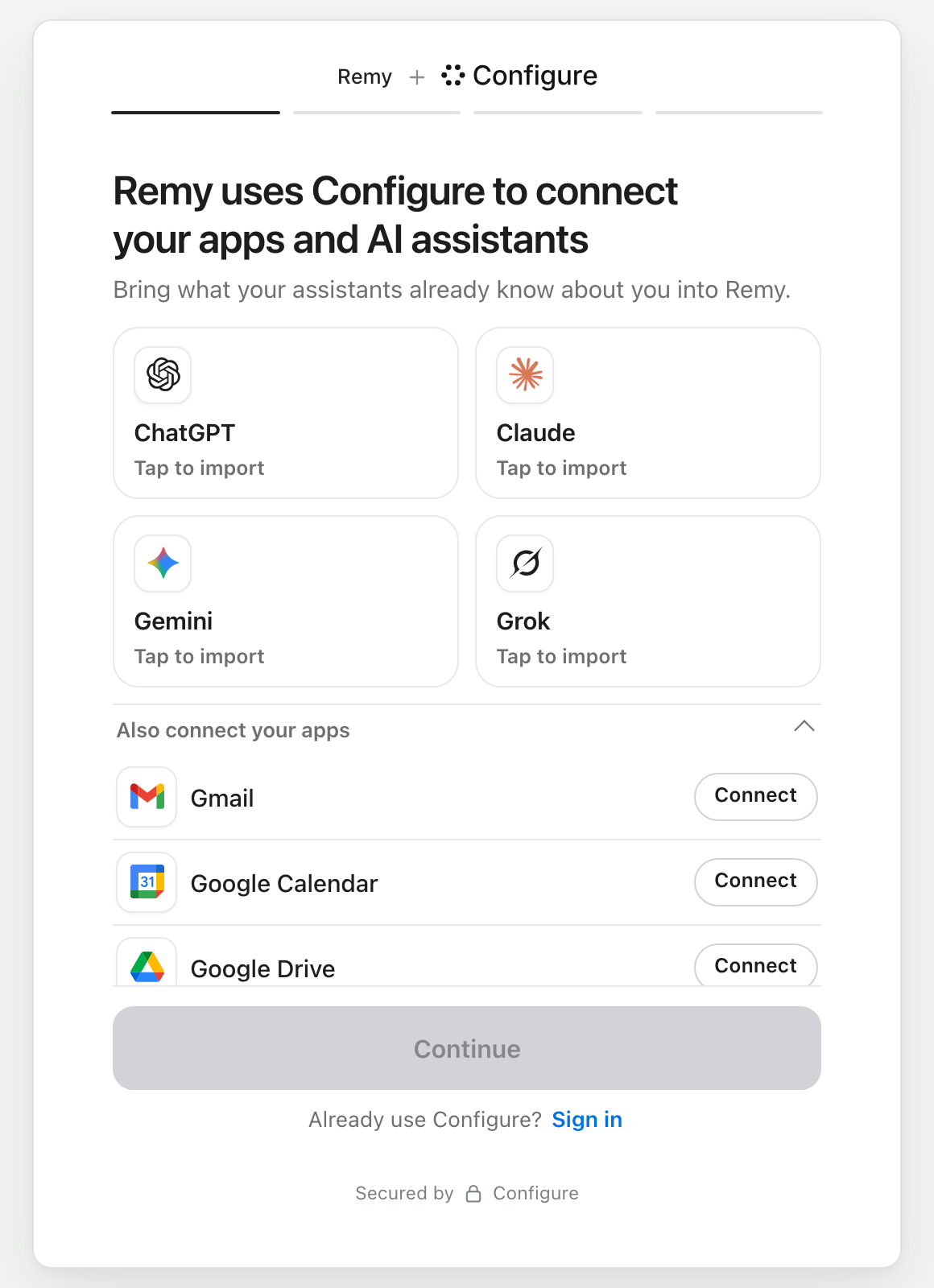
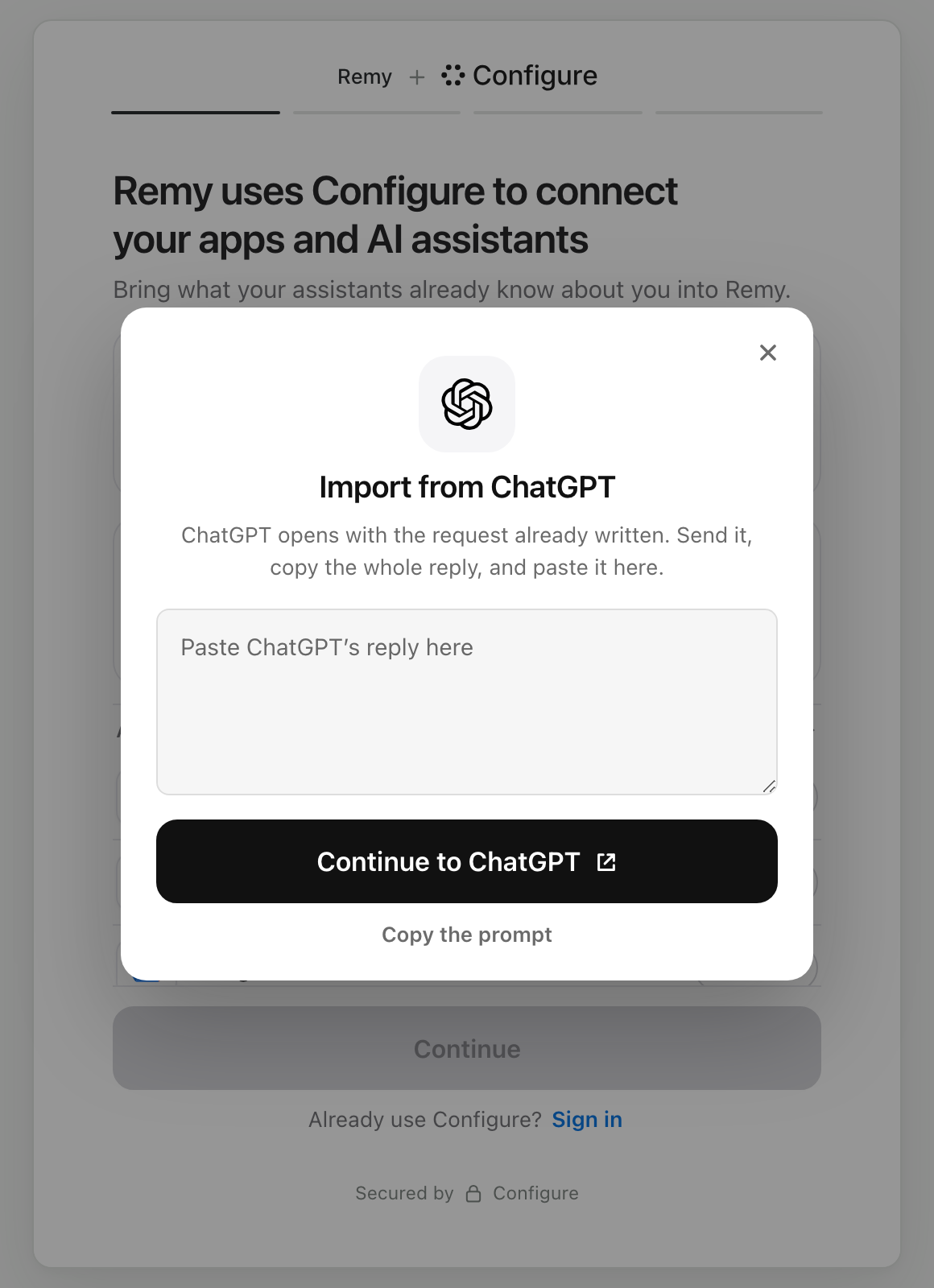
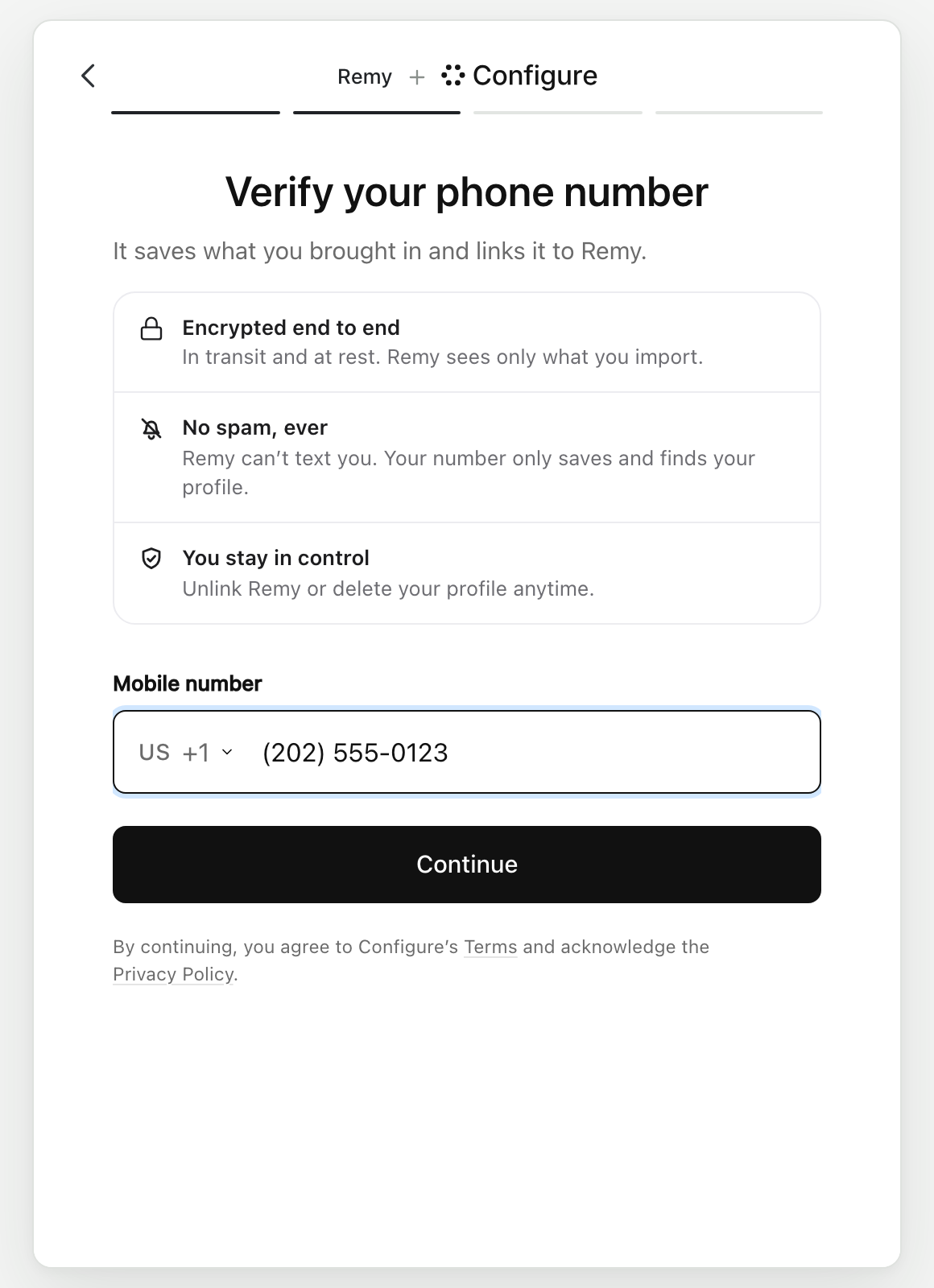
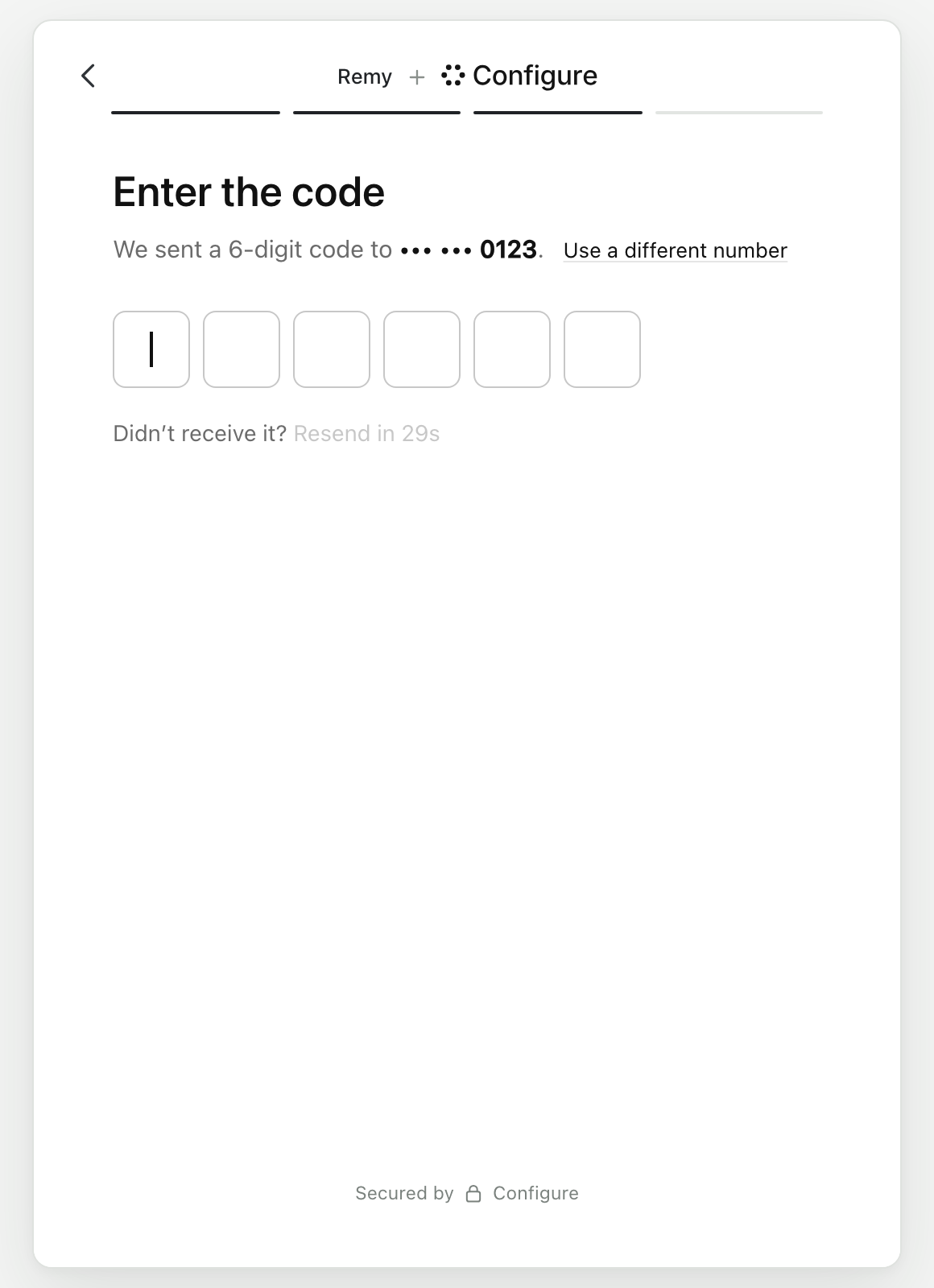
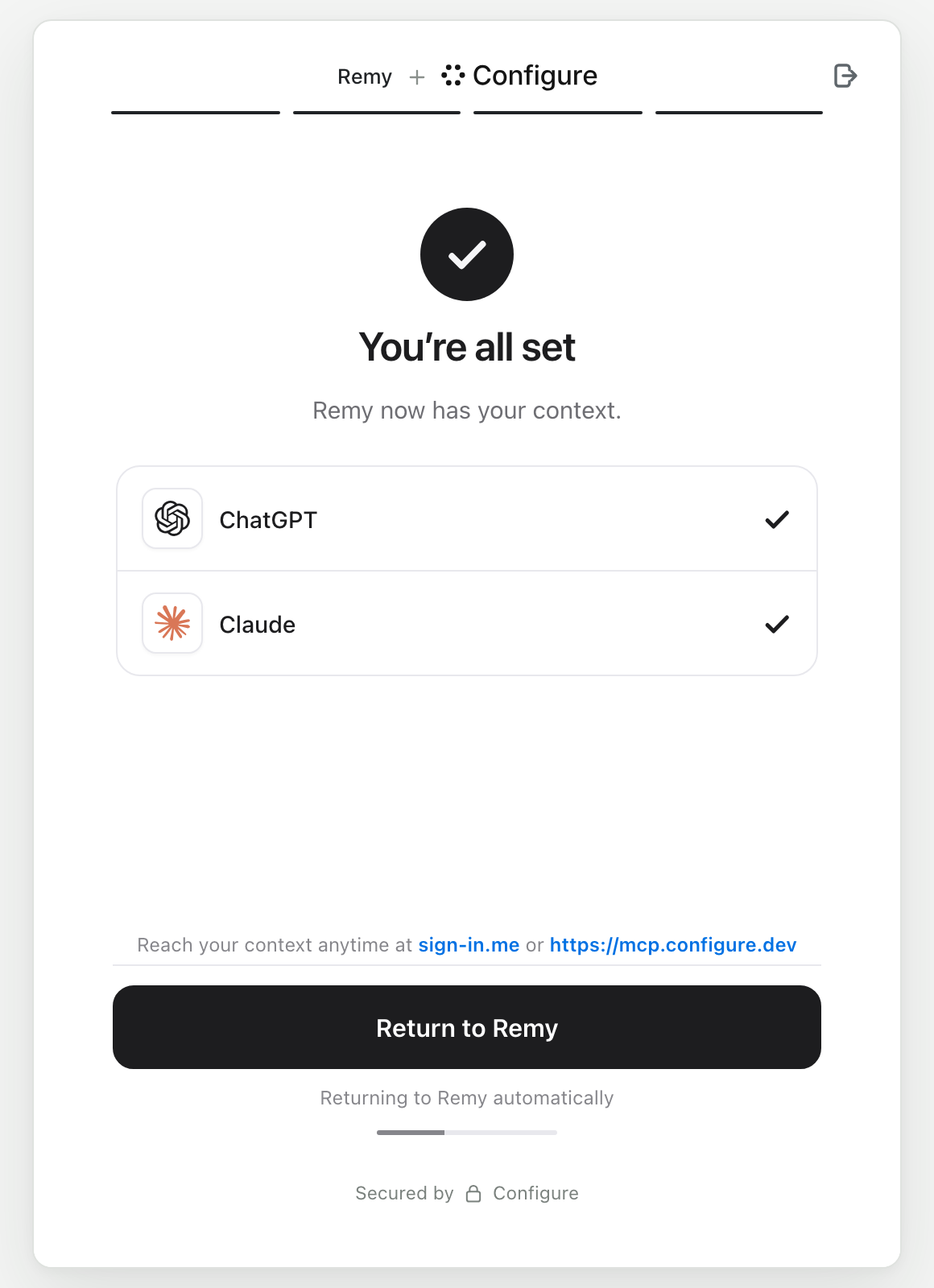
There is no permissions screen. Finishing the flow approves your agent. The user can narrow or revoke access later on their Configure profile. A user who already has a Configure account taps Sign in on the first screen and enters their phone number and code.
The page asks for a mailbox only when you require one. What the hosted flow asks for has every screen and how to require an app or an assistant.
Try it yourself. The link opens the user-facing hosted flow.
5. Handle the callback
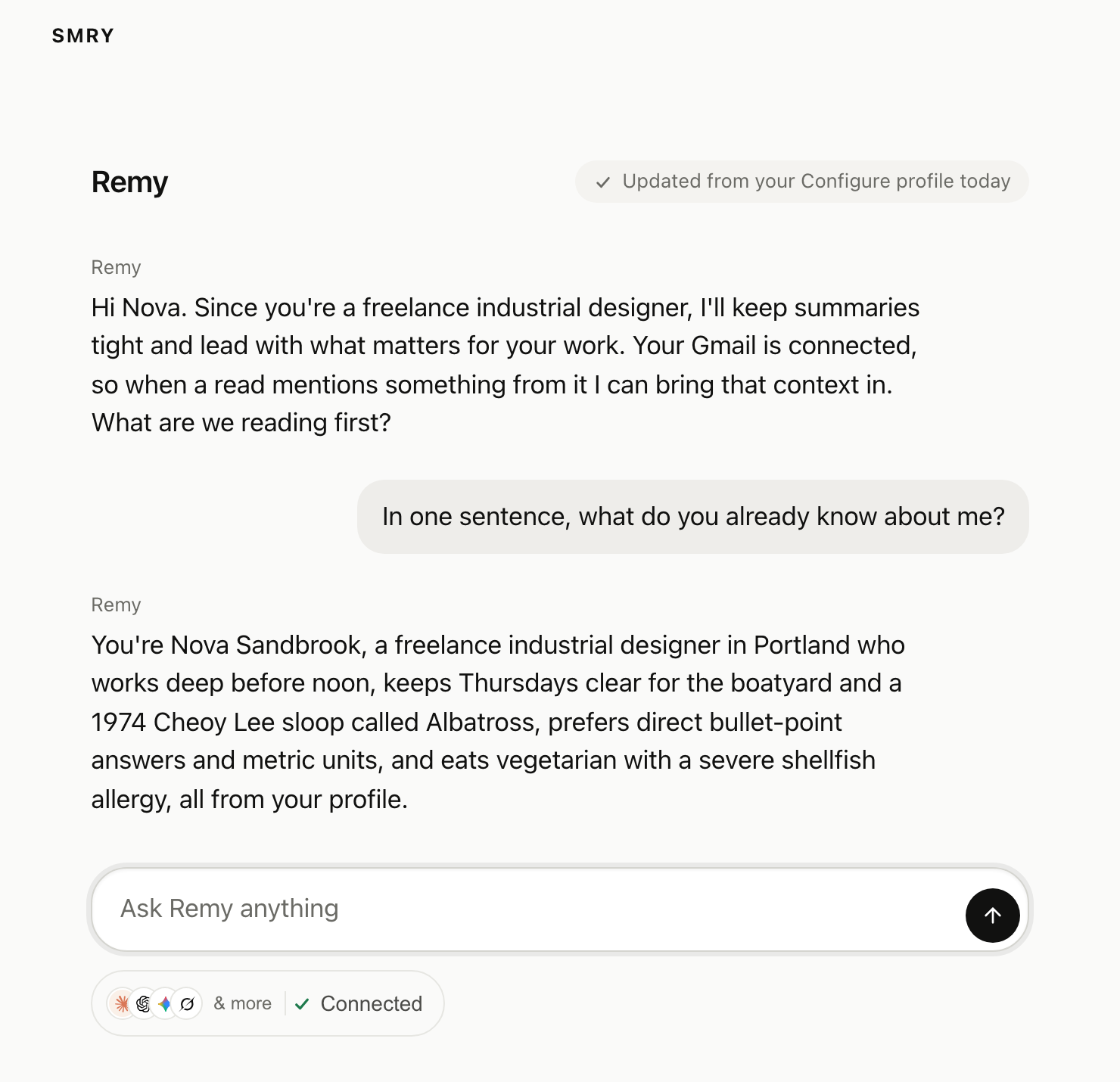
Configure sends the user to RETURN_URL. The callback route refreshes their stored context (step 6) and sends them to the chat.
ts
// Configure sends the user here when they finish.
app.get("/configure/return", async (req, res) => {
  const context = await contextFor(req.user.id, { force: true });   // step 6: reads the profile; null until they connect
  if (!context) return res.redirect("/?configure=not-finished");     // they closed Configure's page early
  res.redirect("/chat");                                              // their first chat starts with their context
});
Apply these callback requirements:
- Check the profile connection status. A request to the callback URL does not prove that the user connected.
contextForreadsprofile.linkedto determine the status. - Refresh the profile in the callback. Creating a connection URL does not mean the user completed the hosted flow. New imports can take a few minutes to process, so the first read may return incomplete context.
To display connected sources or prefill a form from the user profile, see Onboarding.
6. Keep their context current
Your server refreshes profile context and commits conversation messages.
Refresh each connected user's profile once a day. Cache the result and include it in the first model request of each session. Connected agents contribute ongoing updates through their integrations, and users can add context through imports and app connections. Indicate when your app last refreshed it, for example: "Refreshed from your Configure profile today".
The example checks the cache age when a session requests context. If the cache has expired, the server refreshes it before returning the result. This avoids reliance on a background timer in environments with multiple instances or serverless cold starts.
ts
const A_DAY = 24 * 60 * 60 * 1000;
const NOT_CONNECTED = 5 * 60 * 1000;

// Called on the first turn of a session. Returns fast when the stored copy is
// fresh, and refreshes it when it is not.
export async function contextFor(userId: string, { force = false } = {}) {
  const cached = await store.get(userId);                    // { text, refreshedAt } or null

  // Cache "not connected" too, or every turn from every unconnected user is a
  // live read. Keep it short so a user who connects is picked up within minutes.
  const ttl = cached?.text ? A_DAY : NOT_CONNECTED;
  if (!force && cached && Date.now() - cached.refreshedAt < ttl) return cached.text;

  const read = await profileFor(userId).read({
    sections: ["identity", "preferences", "summary", "integrations"],
  });
  const text = read.profile.linked ? read.profile.format() : null;   // null until they connect
  await store.set(userId, { text, refreshedAt: Date.now() });
  return text;
}
What read() returns:
ts
const read = await profileFor(userId).read({ sections: ["identity", "preferences", "summary", "integrations"] });
read.profile.linked;                 // boolean: has this user connected
read.profile.identity;               // { name, given_name, family_name, email, email_verified, role, occupation, location, company_website, ... }
read.profile.summary;                // one paragraph
read.profile.integrations;           // { gmail: { connected }, calendar: { connected }, drive, notion, sheets }
read.profile.format();               // the whole thing as text for a system prompt
read.profile.format({ guidelines: false });  // the same without Configure's handling guidelines
Step 5 already refreshes once, with force: true, so the first session does not wait a day.
ts
// First turn of every session, for a linked user.
const context = await contextFor(user.id);
const systemPrompt = context
  ? `${basePrompt}\n\n<user_context>\n${fence(context)}\n</user_context>`
  : basePrompt;                          // not connected yet: nothing to inject
Implement the fence helper in your app. Profile text can contain the delimiter you use in the system prompt. Remove that delimiter before inserting the text. See Trust and boundaries for the helper and failure cases.
Commit the messages from every turn, including interrupted turns and users who have not connected. Before connection, the profile is scoped to your developer account and identified by externalId. When the user connects, Configure links the existing profile to their account and preserves its context.
Never read the profile on a turn to decide whether to commit. The stored copy already answers linked.
ts
await profileFor(user.id).commit({
  messages: [
    { role: "user", content: userText },
    { role: "assistant", content: assistantText },
  ],
});
format() includes Configure's handling guidelines, about 2,400 characters telling the model not to invent personal facts. Pass guidelines: false when you have your own. The Python SDK defaults to off, so pass guidelines=True there when you want them.
Check the text before you inject it. On an empty profile, format() returns the guidelines and nothing else, about 2,375 characters. format({ guidelines: false }) returns an empty string in that case, which is easy to test.
A turn can complete, be interrupted, or fail. If your app streams responses, commit from the stream completion callback so messages are saved in each case:
ts
return result.toUIMessageStreamResponse({
  // Without this, the end callback does not run when the user stops the answer
  // or closes the tab, and that exchange is lost.
  consumeSseStream: consumeStream,
  originalMessages: turnMessages,   // so the callback sees the user's message, not only the reply
  onEnd: ({ messages }) => {
    // Not awaited: a commit must not delay the reader or fail the turn.
    void commitTurn(user.id, messages).catch(() => {});
  },
});
Send only the messages that exist. A stopped turn often has no assistant text, and an empty message is rejected.
Truncate messages before calling commit. The call accepts up to 20 messages, 16,000 characters per message, and 50,000 characters in total. The SDK throws INVALID_INPUT if these limits are exceeded. Handle this error even when the commit runs asynchronously.
The result has status: processing when the commit was queued, or completed when it ran inline. facts_written and rejected_memories appear once it has run. Pass sync: true to always wait for them.
Keep the chat available if Configure is unavailable. Set a read timeout and continue without profile context if the read fails. Handle commit errors separately from the chat response:
ts
const context = await Promise.race([
  contextFor(user.id),
  new Promise((resolve) => setTimeout(() => resolve(null), 1500)),   // your budget, not ours
]).catch(() => null);                                                 // no context beats no answer
Do the same for every Configure call in a turn.
WARNING
Run profile refreshes and conversation commits on your server. A model with access to the tools may not call them consistently.
7. Give the model the Configure tools
The cached profile provides initial context. The configure_* tools let the model search approved context, save new information, and access connected apps. Your server creates a separate MCP session for each user.
Create the MCP session before sending a model request that exposes remote MCP tools. Pass its endpoint and bearer token in that request, and reuse the session during the turn. The model cannot call remote tools that were not included in its request. For SDK tool dispatch instead, provide profile.tools() and route calls through profile.executeTool() as a separate integration path.
Anthropic. Use @anthropic-ai/sdk 0.123 or later, the mcp-client-2025-11-20 beta, mcp_servers, and a matching toolset.
OpenAI. The Responses API takes the session as a remote MCP tool. The bearer goes in authorization.
Vercel AI SDK. The session goes in as an MCP client with the bearer in its headers. Close it when the turn ends.
Any MCP client. Use a client that supports Streamable HTTP and bearer authentication. The example uses the official TypeScript SDK:
All four samples belong in server/turn.ts.
ts
const session = await profileFor(user.id).mcpSession();

const response = await anthropic.beta.messages.create({
  model: "claude-opus-5",
  max_tokens: 16000,
  betas: ["mcp-client-2025-11-20"],
  system: systemPrompt,
  messages: turnMessages,
  mcp_servers: session.mcp_servers,                 // url, name, authorization_token
  tools: session.mcp_servers.map((s) => ({          // every server needs a matching toolset
    type: "mcp_toolset",
    mcp_server_name: s.name,
  })),
});
ts
const session = await profileFor(user.id).mcpSession();

const response = await openai.responses.create({
  model: "gpt-5",
  instructions: systemPrompt,
  input: turnInput,
  tools: session.mcp_servers.map((s) => ({
    type: "mcp",
    server_label: s.name,
    server_url: s.url,
    authorization: s.authorization_token,
    require_approval: "never",
  })),
});
ts
import { streamText, stepCountIs, consumeStream } from "ai";
import { createMCPClient } from "@ai-sdk/mcp";

const [server] = (await profileFor(user.id).mcpSession()).mcp_servers;
const configureMcp = await createMCPClient({
  transport: { type: "http", url: server.url, headers: { Authorization: `Bearer ${server.authorization_token}` } },
});

const result = streamText({
  model,
  system: systemPrompt,
  messages: turnMessages,
  stopWhen: stepCountIs(5),
  tools: { ...yourTools, ...(await configureMcp.tools()) },
  // streamText returns before the answer streams, so closing the client in a
  // finally block would cut the answer off. Close it when the stream ends.
  onFinish: () => { void configureMcp.close(); },
  onError: () => { void configureMcp.close(); },
});

return result.toUIMessageStreamResponse({ consumeSseStream: consumeStream });
ts
import { Client } from "@modelcontextprotocol/sdk/client/index.js";
import { StreamableHTTPClientTransport } from "@modelcontextprotocol/sdk/client/streamableHttp.js";

const [server] = (await profileFor(user.id).mcpSession()).mcp_servers;
const client = new Client({ name: "your-app", version: "1.0.0" });
await client.connect(
  new StreamableHTTPClientTransport(new URL(server.url), {
    requestInit: { headers: { Authorization: `Bearer ${server.authorization_token}` } },
  }),
);
const { tools } = await client.listTools();    // 17 tools for a user session
Anthropic. Anthropic's API rejects mcp_servers without a matching mcp_toolset, so keep both.
OpenAI. Use this rather than running the calls yourself. toOpenAIFunctions(profile.tools()) with profile.executeTool(call) also works, but on a profile keyed by externalId it serves only the profile tools. Connector tools return a connect link until they are called through the session or a user token.
Vercel AI SDK. toAISDKTools(profile) from configure/ai-sdk also exists. On a profile keyed by externalId it serves only the profile tools. The session above is what reaches connected apps.
Any MCP client. Give tools to your model loop and send its calls to client.callTool. Use one session per user. The bearer identifies the user, so no tool takes a user ID.
The model can use configure_profile_search to retrieve additional context and configure_profile_remember to save information. Connected-app tools, such as configure_gmail_search and configure_calendar_get, provide access to approved app data. Users can add app connections without a new deployment of your app.
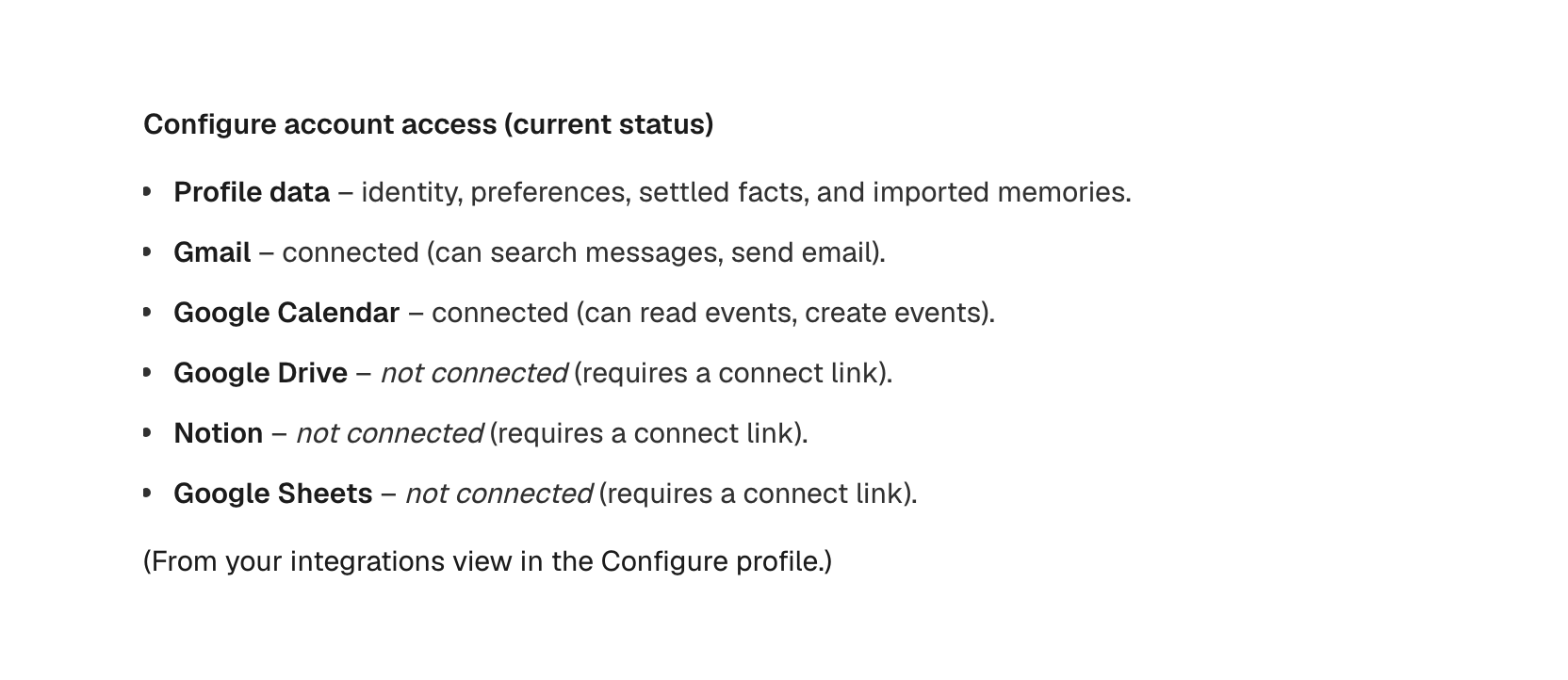
Try it in the sandbox
Test the integration with synthetic data before using production profiles. This endpoint requires no Configure account and applies a per-IP rate limit:
bash
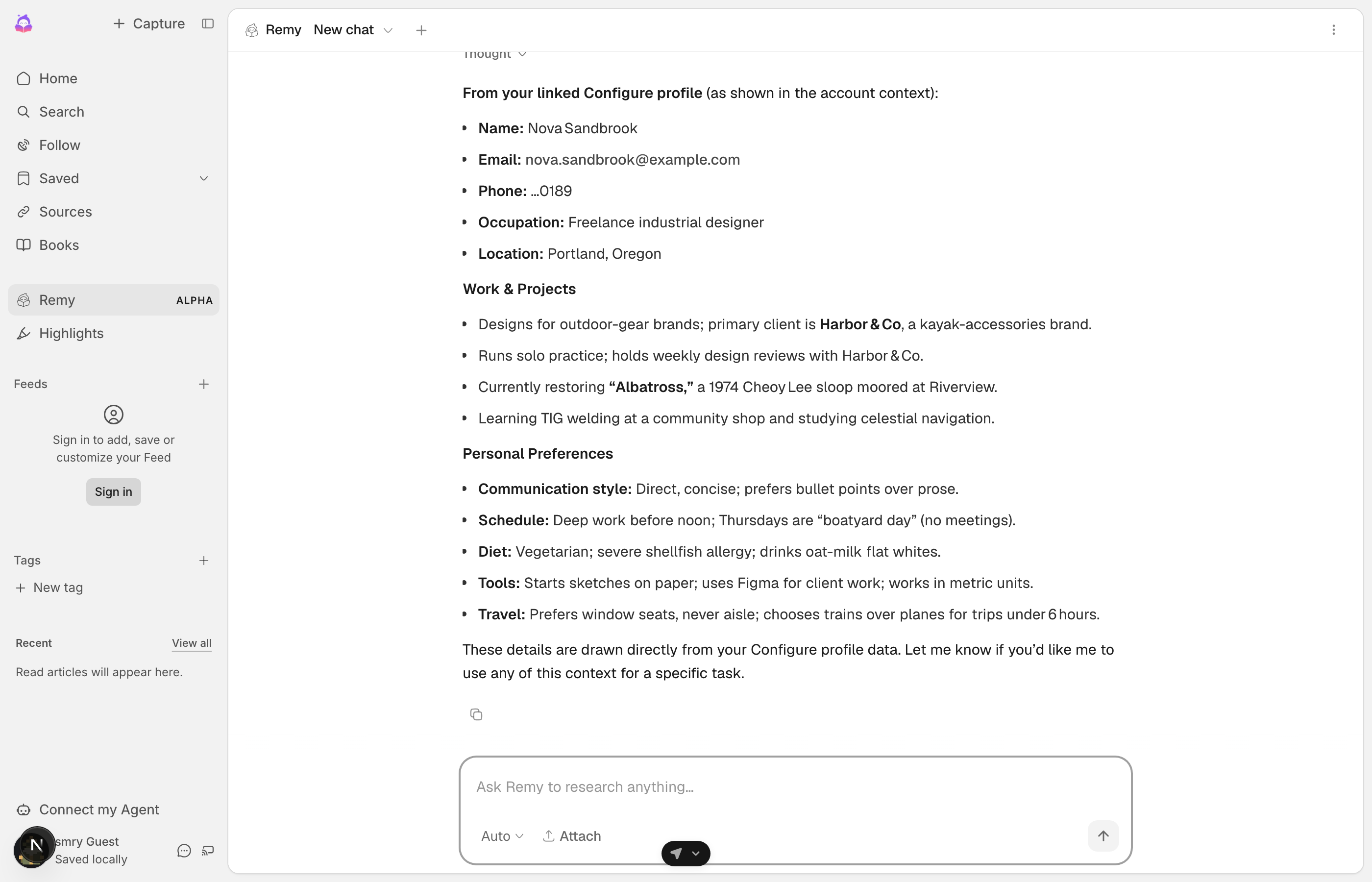
curl -X POST https://api.configure.dev/v1/sandbox/provisionYou get sk_test_ and pk_test_ keys, a test agent, and a synthetic user, Nova Sandbrook, external ID sandbox-user, already linked with Gmail and Calendar connected. Point your .env at the test key and run the seven steps as her. The tool list grows from nine tools on your key to seventeen on her session; the MCP page explains why. The response also includes her test phone number and its fixed code, so you can go through the Configure hosted flow yourself. Every Configure page accepts them in the test environment and never sends a text.
To test a failure, call POST /v1/sandbox/simulate with your sk_test_ key:
| Scenario | What it does | What to watch |
|---|---|---|
gmail_token_expired | Makes her Gmail connection fail like a revoked token. | Your tool_not_connected handling, and the link in its payload. |
POST /v1/sandbox/reset restores her seeded state. returnUrl must be https in the test environment too, so run your callback route behind an https address while you develop.
To start from a running app, configure-quickstart has three examples of this pattern: a chat app, a product onboarding, and an SMS agent.
Handle errors
| What you see | What it means | What to do |
|---|---|---|
authorization_required | The user is not connected. It never means "no data on this user". | The result has a connect_url. Send the user to it, through /configure/start or as the link itself. |
approval_required | The user linked a Configure account, so your key no longer has access to their profile. They need to approve your agent. | Send them through /configure/start again. Finishing the Configure hosted flow approves your agent. See Your own users. |
-32009 commit_required | A profile read requires a corresponding conversation commit. | Commit the turn, then retry. configure_connect is not the fix. |
tool_not_connected | The user has not connected that app, or its token was revoked. | On an externalId profile the call returns the connect payload. On a token profile it throws with suggestedAction "connect_tool" (never connected) or "reconnect" (access expired) and no link, so create one with connect({ app }). See Connectors. |
429 rate_limited | Too many calls from your account in a short time. The limit is per account, not per user. The body has retry_after in seconds. | Back off and reuse the link you have. Each link is valid until expires_at. |
402 PAYMENT_REQUIRED | Your account is over its monthly read quota. The user's connection is fine. | Do not show a connect link; it will not help. Fix the plan, and let the turn answer without context. |
The SDK does not put the server's own code, such as approval_required, on the error. Match statusCode and suggestedAction instead. 401 (AUTH_REQUIRED) means your key is wrong. 403 (ACCESS_DENIED, suggestedAction: "complete_approval") means this user has not approved your agent. Handle them separately: if you treat both as "not connected" and cache it, a key rotation marks every user as unconnected.
TIP
The user connects agents and apps through the hosted flow. Your agent receives approved context and commits new context from subsequent conversations.